> ## Documentation Index
> Fetch the complete documentation index at: https://docs.uselooop.com/llms.txt
> Use this file to discover all available pages before exploring further.
# Wishlist List
> Wishlist list element is used to display the list of products that are added to the wishlist.
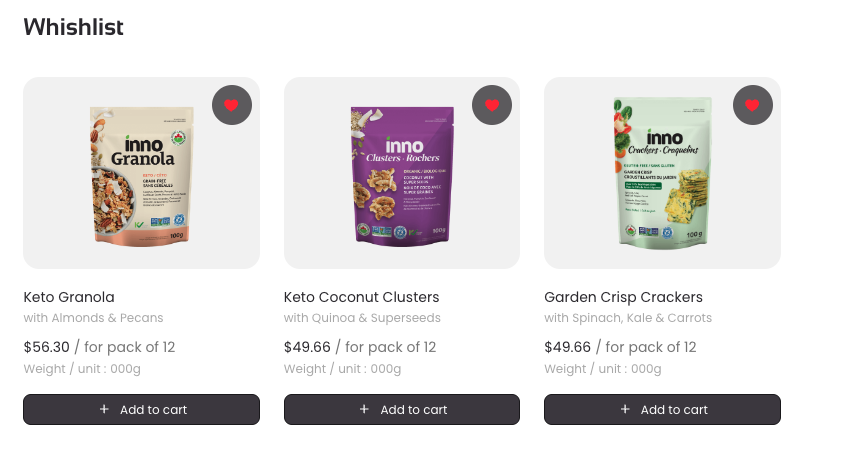 ## Steps
Add a Webflow CMS collection of products to the page. Inside the CMS collection item create a [product card](/webflow/productcard/productcard).
Follow the steps to add a [wishlist button](/webflow/wishlist/wishlist-button) to the product card.
***
## Steps
Add a Webflow CMS collection of products to the page. Inside the CMS collection item create a [product card](/webflow/productcard/productcard).
Follow the steps to add a [wishlist button](/webflow/wishlist/wishlist-button) to the product card.
***
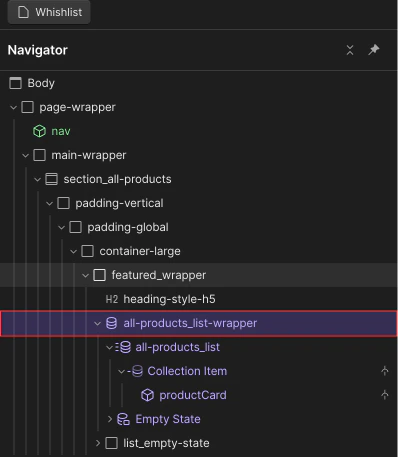 Add following custom attributes to the wishlist CMS wrapper:
```html theme={null}
looop=wishlist_wrapper
```
Add following custom attributes to the wishlist CMS wrapper:
```html theme={null}
looop=wishlist_wrapper
```