> ## Documentation Index
> Fetch the complete documentation index at: https://docs.uselooop.com/llms.txt
> Use this file to discover all available pages before exploring further.
# Product Card
> A div that contains a product image, price, quantity input, and add to cart button
The Product Card is the component that contains the main elements of a product, such as the image, price, quantity input, and add to cart button.
It is used to dictate which Shopify product is linked to the current div/section.
This component is used by Looop to find the add-to-cart button, quantity input, options selector, and subscription selector related to the product.
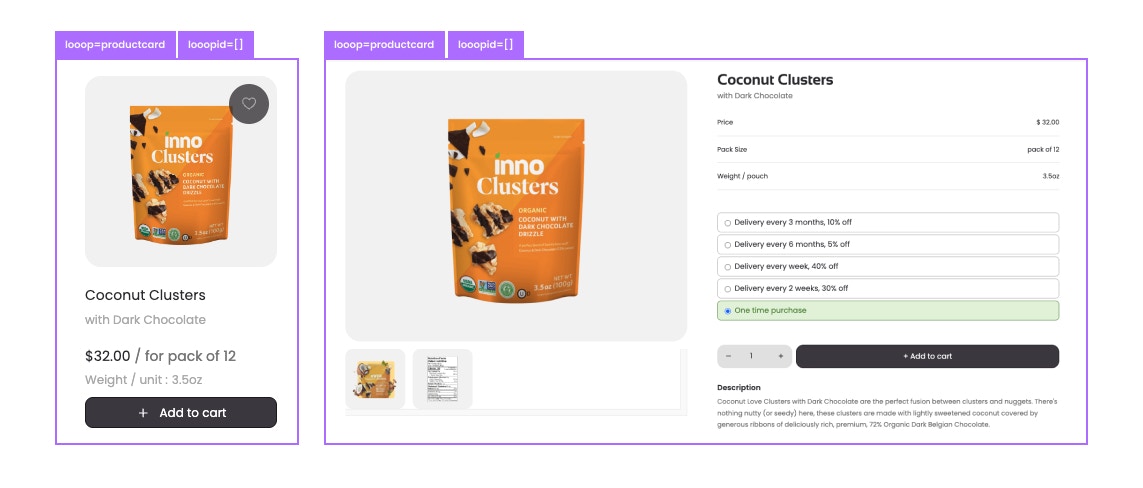 Attributes:
```html theme={null}
looop=productcard
```
```html theme={null}
looopid=LOOOP_ID_FIELD_OF_PRODUCT_CMS
```
```html theme={null}
lp-default-variant=LOOOP_ID_OF_DEFAULT_VARIANT
```
The value of `looopid` is the Shopify ID of the product. This can be assessed using the dynamic value for the custom attribute in element setting in Webflow designer.
On **product page** we will use the section as product card, and will place all ecommerce related elements inside the product card.
Attributes:
```html theme={null}
looop=productcard
```
```html theme={null}
looopid=LOOOP_ID_FIELD_OF_PRODUCT_CMS
```
```html theme={null}
lp-default-variant=LOOOP_ID_OF_DEFAULT_VARIANT
```
The value of `looopid` is the Shopify ID of the product. This can be assessed using the dynamic value for the custom attribute in element setting in Webflow designer.
On **product page** we will use the section as product card, and will place all ecommerce related elements inside the product card.
For **collection lists** we will use the Webflow Collection Item as the product card, and will place all ecommerce related elements inside the product card.
Without the `looopid` attribute, the product card will not be linked to a product and will not be able to add the product to cart of fetch options and subscription plans for the product.