> ## Documentation Index
> Fetch the complete documentation index at: https://docs.uselooop.com/llms.txt
> Use this file to discover all available pages before exploring further.
# Cart Item Quantity
> Input used by a user to change the quantity of any cart item.
## Setup
Cart item quantity input consists of three elements: quantity input, a quantity minus button, and a quantity plus button. This input helps users to change the quantity of parent cart item.
You have the freedom to design this field as your heart desires. Just make sure that the Quantity input is a quantity minus button and a quantity plus button is in the same parent element.
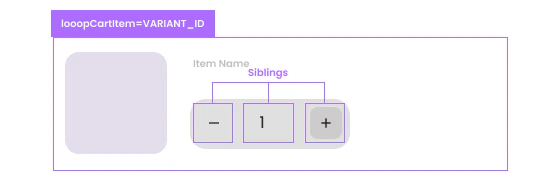 Add the custom attribute to the webflow collection list item element.
```html theme={null}
looop=itemquantity
```
```html theme={null}
value=1
```
```html theme={null}
type=number
```
```html theme={null}
min=1
```
### Minus Button
```html theme={null}
looop=itemquantityminus
```
### Plus Button
```html theme={null}
looop=itemquantityplus
```
Item Quantity should only be used inside the variant collection item in the cart list. It won't function outside the collection item.
Add the custom attribute to the webflow collection list item element.
```html theme={null}
looop=itemquantity
```
```html theme={null}
value=1
```
```html theme={null}
type=number
```
```html theme={null}
min=1
```
### Minus Button
```html theme={null}
looop=itemquantityminus
```
### Plus Button
```html theme={null}
looop=itemquantityplus
```
Item Quantity should only be used inside the variant collection item in the cart list. It won't function outside the collection item.